
Adding stairs: anatomy, shapes, and setup
Stairs are the most technical thing on a floor plan — six terms decide whether what you've drawn is stairs you can actually walk up. Here's all of it, from anatomy (rise, riser, tread, width, length, direction) to shape (straight, L-left, L-right, U) to placement and a walk-up in 3D.
Stairs are the most technical thing on a floor plan. Six terms decide whether what you've drawn is stairs you can actually walk up, or a slope, or a ladder. The good news: each term is simple, the numbers are standard, and Room Sketch 3D handles the math — you just need to pick the right shape and feed it accurate dimensions.
This guide is the long version, on purpose. Skim it for terminology, or read it through if you're laying out a floor for the first time. Room Sketch 3D supports the three staircase shapes that cover almost every home: a straight run, an L-shape (one 90° turn with a landing, in a left or right orientation), and a U-shape (two 90° turns — a switchback that doubles back on itself with a landing in the middle).
What you'll need
- •A floor plan to add stairs to — see How to create a rectangular floor plan or Drawing a custom-shaped room
Step by step
- 1
Drop a staircase in from the Room Structure panel
Open the Room Structure panel on the left and click the Stairs tile, then click on the floor where the staircase goes. A default straight run lands; you'll shape and size it from there in the inspector. (The Stairs tile sits in the same 3×3 grid as Door, Window, Opening, Fireplace, and the sliding-door variants — see Adding doors.)
The Stairs tile lives in the Room Structure panel, next to Door, Window, and the other wall features. - 2
Learn the six terms (the anatomy of a staircase)
Before you touch the inspector, know what you're setting. A real staircase has six measurements, and Room Sketch 3D speaks the same language a builder does. Rise — the total vertical height the staircase climbs, floor to floor. In a typical house, around 96–108 inches (8–9 feet). Riser — the vertical face of a single step (the bit your shin would hit). Standard residential riser height: 7–7.75 inches. Comfortable, code-compliant in most jurisdictions. Tread — the horizontal surface of a step, where your foot lands. Standard depth: 10–11 inches. Shorter and you can't fit your foot; longer and the staircase reads like a ramp. Rise ÷ riser ≈ the number of steps. Eight feet of rise ÷ a 7.5-inch riser ≈ 13 steps. Width — how wide the staircase is, perpendicular to the direction you climb. Residential: 36–40 inches. Code minimum is usually 36. Length (or run) — the total horizontal distance the staircase covers. A straight residential flight typically needs 12–15 feet. Direction — does this staircase go up from the floor you're on, or down to the level below? It matters for what's at the top vs the bottom in 3D, and for how the staircase appears on the plan.
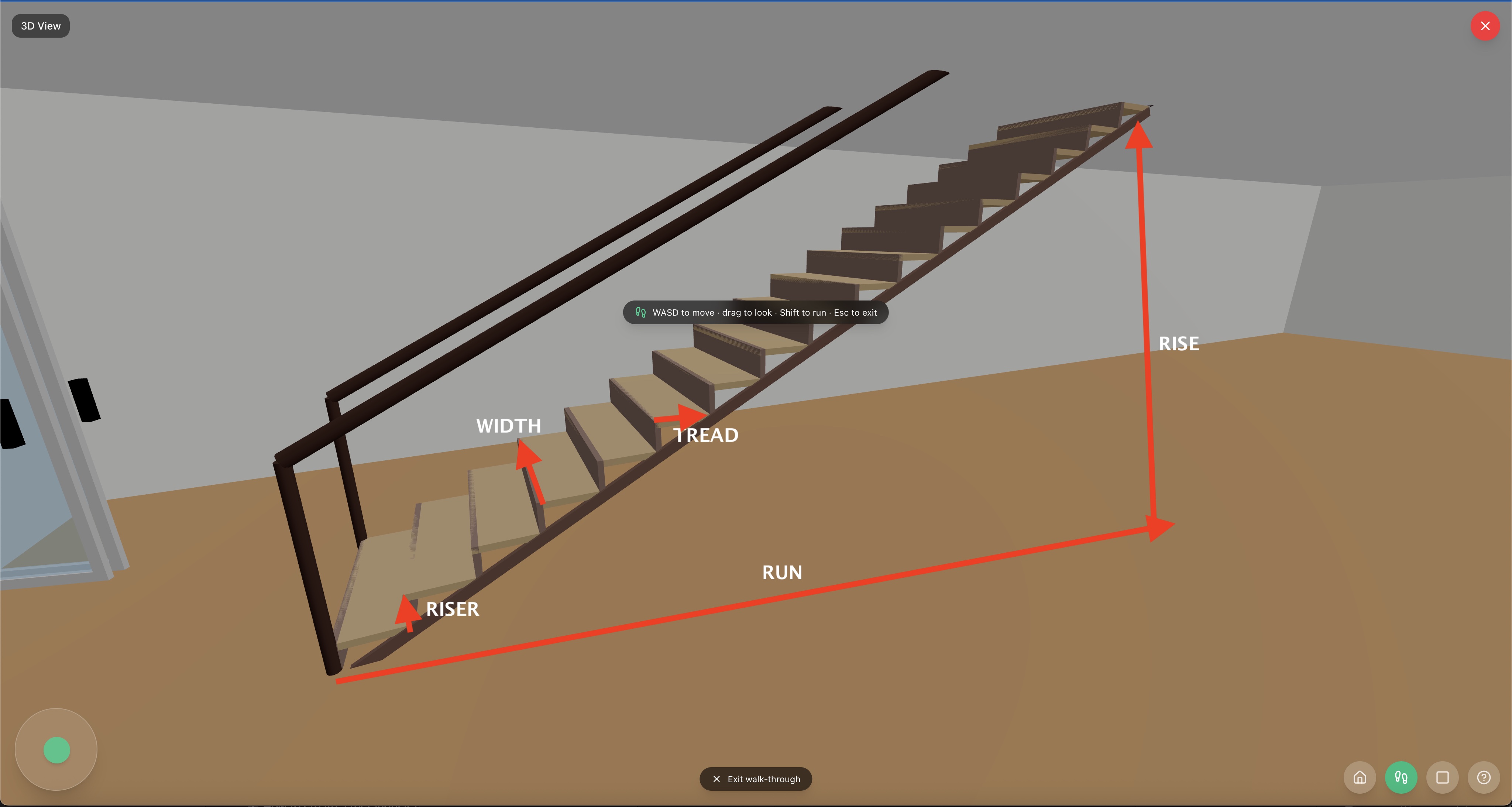
The six terms: rise (total height), riser (each step's face), tread (each step's surface), width, length, direction. - 3
Pick the shape — Straight, L (left or right), or U
Three shapes cover almost every residential staircase, and each one trades a different thing for the others. Straight — one continuous flight, no turn. The easiest to climb, the safest to descend, and the one that eats the most linear floor. Use it when you have 12–15 feet of run to spare in a single line. L-shape — one 90° turn at a landing, partway up. The footprint is two flights at right angles, separated by the landing. And L-shape has a direction: as you climb, the turn either goes to your left or to your right. Pick the orientation that matches the real staircase you're modelling — if the real stairs turn left going up, set the L to left. U-shape — also called a switchback or half-turn. Two flights doubling back on themselves, with a landing in the middle. The most compact footprint of the three — common in narrow townhouses and stairwells. Use it when you need to climb a full story of rise inside a small floor area. Switching shapes updates the footprint live on the plan, so you can try each one and see what fits.
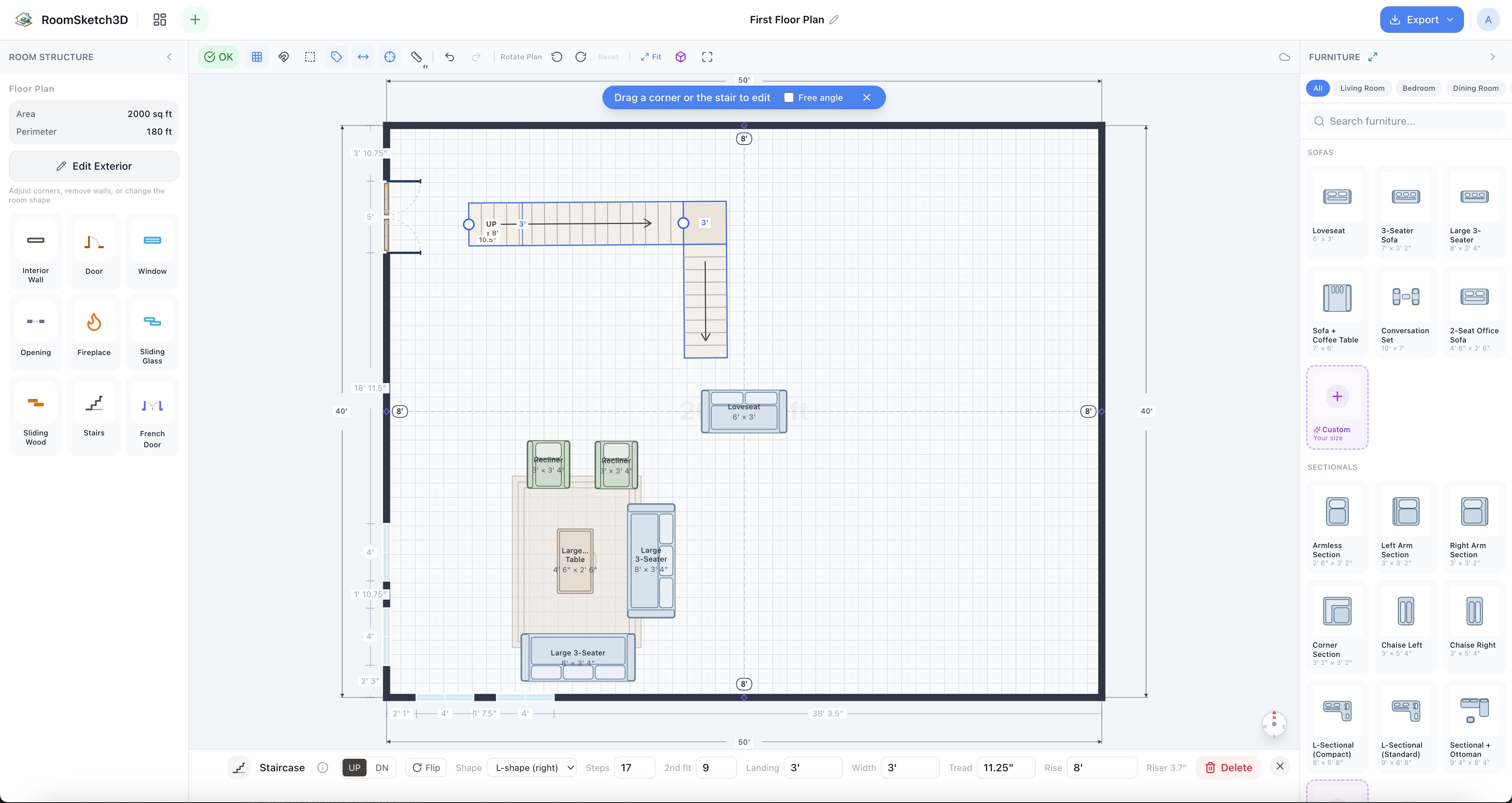
Straight, L-left, L-right, U: the three shapes that cover almost every home. - 4
Set the dimensions in the inspector
With the staircase selected, the inspector exposes the values you just learned: the shape, the rise, the width, the length, the direction, and (for an L) the turn orientation — left or right. Type the rise of your actual floor-to-floor height, set the width to a residential 36–40 inches, and let the length fall out from the standard tread depth (or set it directly if you have a target). For an L, set the orientation; for a U, the landing sits at the middle turn. Each change updates the footprint and the rendered staircase on the plan immediately.
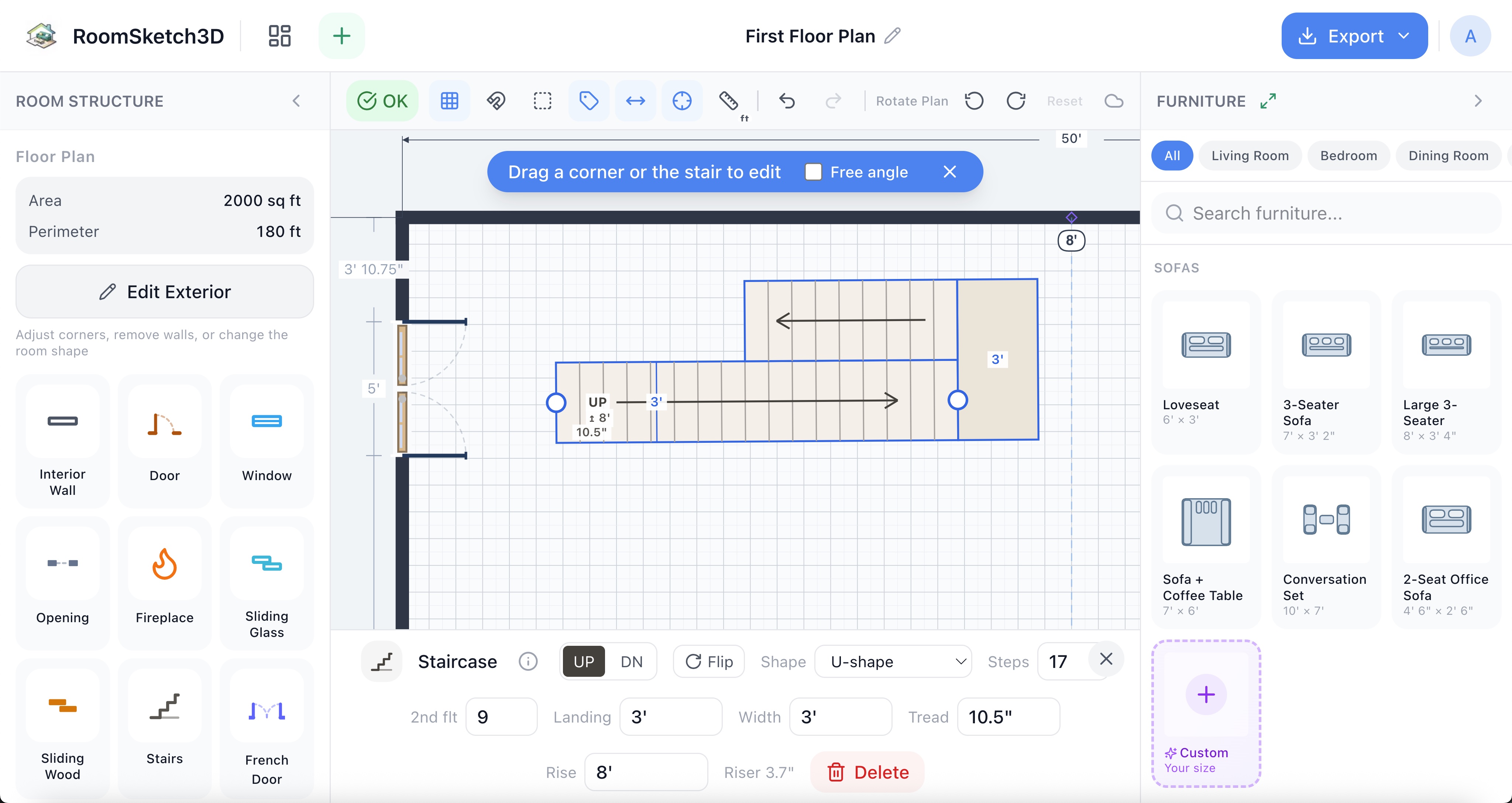
Type the rise, width, and length; pick the shape and (for L) the turn direction. - 5
Position it on the plan
Drag the staircase to where it actually sits in the home — along a wall, in a corner, or in an open space mid-room. The footprint stays accurate as you move it, so Smart Flow Check checks furniture against the real stair area; you can't accidentally drop a sofa onto where the staircase is.
- 6
Walk up it in 3D
Switch to 3D and the staircase renders as real stairs — walls, landings, slope. Drop into walk mode (W/A/S/D + mouse, or the on-screen joystick) and walk up it. This is the part that catches what 2D hides: head clearance, a doorway opening at the top, a landing that's tighter than it looked. See Switching to 3D and walking through your home.
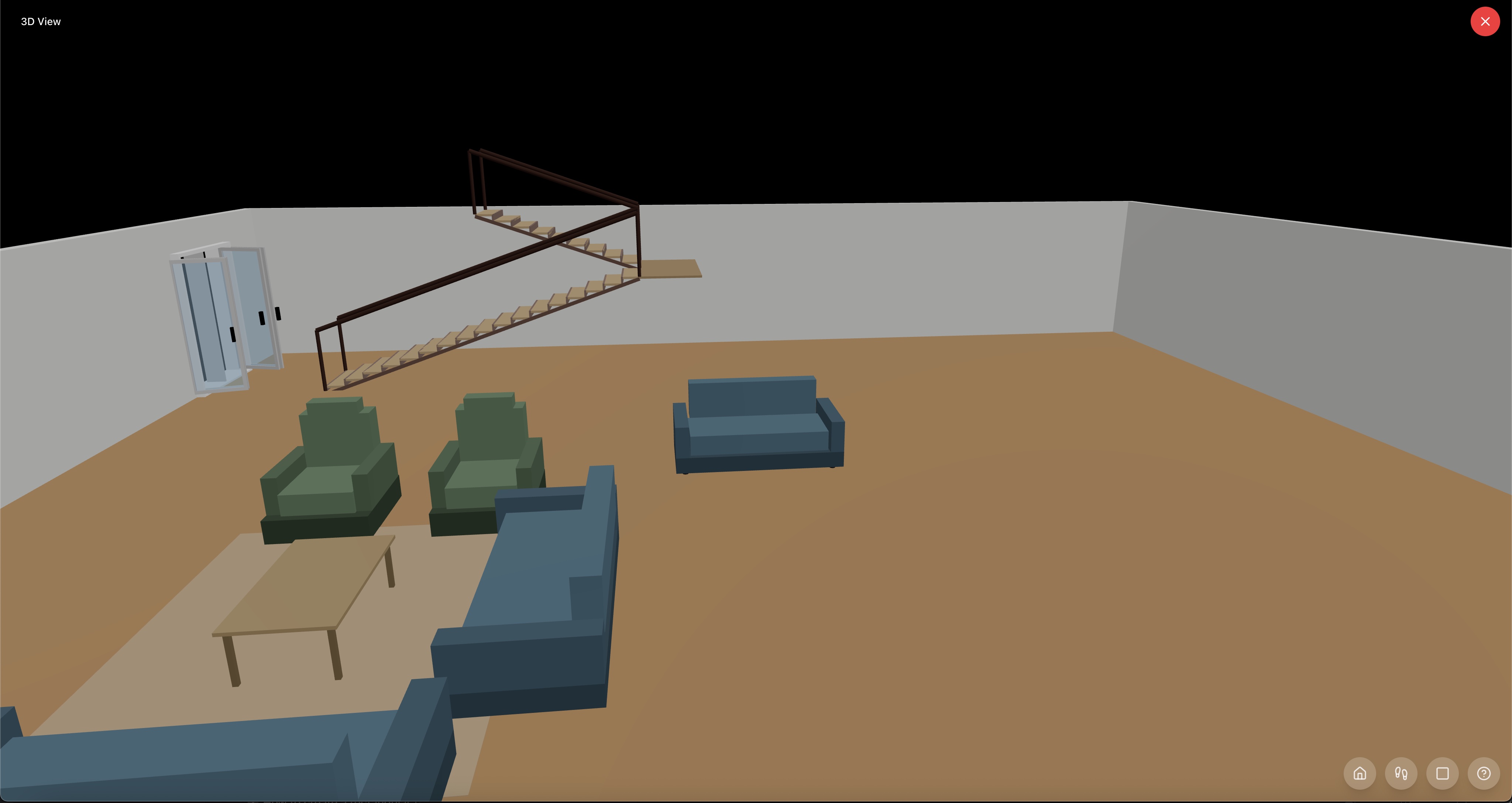
In 3D, the staircase becomes real stairs you can walk up — head clearance, landings, and all.
Tips
Place stairs before you furnish
Stairs reserve the floor area everything else has to work around. Drop them in before you place furniture, not after — their footprint dictates which walls become usable for seating and which become walkway.
Match the rise to your real floor-to-floor
Most homes are 96 inches (8 feet) floor to floor; some are 108 (9 feet). The number of steps falls out of that — you don't have to count them yourself. But if the rise is wrong, the whole staircase is wrong.
L-shape direction: stand at the bottom, look up
If a person climbing the stairs would turn left at the landing, that's a left-handed L. If they'd turn right, it's a right-handed L. Set it to match the real staircase you're modelling so the 3D walkthrough actually walks the way the real one does.
U-shape for the smallest footprint
A U-shaped (switchback) staircase has the smallest total floor area of the three shapes — the two flights stack next to each other instead of running end-to-end. Reach for it when a straight or L run won't fit.
Standard sizes work — use them
Riser 7–7.75 inches. Tread 10–11 inches. Width 36–40 inches. Total straight run 12–15 feet. These aren't arbitrary — they're what comfortable, code-compliant residential stairs actually are. Approximating reality is what makes Smart Flow Check trustworthy around the staircase.
Check the approach in 3D
A staircase that works on paper can have a doorway opening right at the top, an awkward turn into a hallway, or head clearance you forgot about. The 3D walk-up is where you catch all of it.
Common mistakes
Treating the staircase as a small rectangle
A single straight flight needs 12–15 feet of run. If you've allocated a 4×4 patch, you're modelling a ladder, not stairs. Use realistic dimensions or pick an L or U shape to fit a real staircase in a smaller footprint.
Forgetting the L-shape has a direction
An L turning left at the landing is a completely different staircase from one turning right — different rooms above and below, different approach to the foot of the stairs. Pick the orientation that matches the real staircase.
Skipping the landing on L or U shapes
L-shaped and U-shaped staircases need a landing at the turn — that's the bit that makes the turn possible. The landing has real size (at least as wide as the stair). Don't try to model a tight corner as a sharp turn with no landing; it won't read right in 3D and it isn't legal in real life.
Using a non-standard riser to 'make it fit'
If a staircase doesn't fit, the fix is a different shape or more floor area — not a 12-inch riser. Code-compliant residential risers are 7–7.75 inches. Stick to standards; the room layout problem is what needs to change.
Frequently asked questions
What's the difference between rise and riser?
Rise is the total vertical height the staircase climbs from one floor to the next (typically 96–108 inches in a home). Riser is the height of a single step — the vertical face of one step, typically 7–7.75 inches. Total rise ÷ riser height ≈ the number of steps.
What's a tread?
The horizontal surface of a single step — the bit your foot lands on. Standard residential tread depth is 10–11 inches. Shorter and your foot doesn't fit; longer and the staircase feels like a ramp.
How wide should a staircase be?
Residential staircases are typically 36–40 inches wide. Code minimum is usually 36. Wider feels grander but eats more floor area; narrower feels cramped.
What staircase shapes can I add?
Three: Straight (one continuous flight, easiest to climb, most linear floor needed); L-shape (one 90° turn at a landing — choose a left or a right orientation depending on which way the turn goes when you climb); and U-shape (a switchback — two flights doubling back on themselves with a landing in the middle, most compact footprint).
What's the difference between a left-handed and right-handed L-shaped staircase?
Stand at the bottom of the stairs and start climbing. If you'd turn left at the landing, that's a left-handed L. If you'd turn right, it's a right-handed L. They have the same footprint mirrored — pick the one that matches the real staircase you're modelling.
What's a U-shaped staircase?
Also called a switchback or half-turn. Two flights running parallel to each other, with a landing in the middle that turns you 180° between them. It's the most compact way to climb a full story of rise — common in townhouses, stairwells, and split-levels.
How much floor area does a staircase need?
It depends on the shape. A straight residential flight needs around 12–15 feet of run and 3–3.5 feet of width — call it ~40 square feet of floor. An L-shape uses a similar total but in two directions, fitting into a corner. A U-shape fits the same vertical rise into roughly half the linear footprint.
Does Smart Flow Check account for the staircase?
Yes — once placed, the staircase occupies real floor area, and Smart Flow Check checks furniture and walkways against that footprint just like any other obstacle. You can't put a sofa where the staircase is.
Can I see the staircase in 3D?
Yes — the 3D view renders it as real stairs (walls, landings, slope). Drop into walk mode with W/A/S/D or the on-screen joystick and walk up it to check head clearance, landing, and the approach at top and bottom.
Start designing your room
Draw it, furnish it, walk through it in 3D — on web, iOS, and Android.
Open Room Sketch 3DOne-time purchase · No subscription · Web, iOS & Android